Pickleball Australia (PA) clubs using the revSPORT Integration can automatically verify a player’s membership status when they register for events on OpenSports.
This setup allows clubs to offer:
- Member Registration: for players with an active Club Membership, PA Membership, or both.
- Non-Member Registration: for guests within their first 28 days, international visitors, or players with an active PA Membership who do not have a Club Membership.
The 28-day guest window allows new players to try the club before becoming a member. After the guest window has passed, players must have an active PA Membership for insurance purposes to continue registering as a non-member.
Member Registration is used for players who meet your club’s membership requirements, such as an active Club Membership, PA Membership, or both. Eligible players can register through the member option based on your club’s access and pricing rules.
Prerequisites
Before setting up registration rules, ensure your club has completed the revSPORT Integration setup.
How to enable the revSPORT Integration for your club on OpenSports:
- Request the OpenSports integration through revSPORT, sign the agreement, and pay the fee.
- Once enabled, OpenSports will sync Club Membership Expiry and PA Membership Expiry fields into your group account.
To learn more, visit: https://opensports.net/organize/pickleball-australia
How This Setup Works
| Registration Option | Eligible Players | Member Rule |
|---|---|---|
| Member Registration | Active Club Membership | Current Club Member |
| Non-Member Registration | Guests within their 28-day guest period OR players with a current PA Membership | Within 28-Day Guest Window or Current PA Member |
Guests can register as non-members during their first 28 days of registering for club activities. This setup does not limit the number of sessions they can register for during that period.
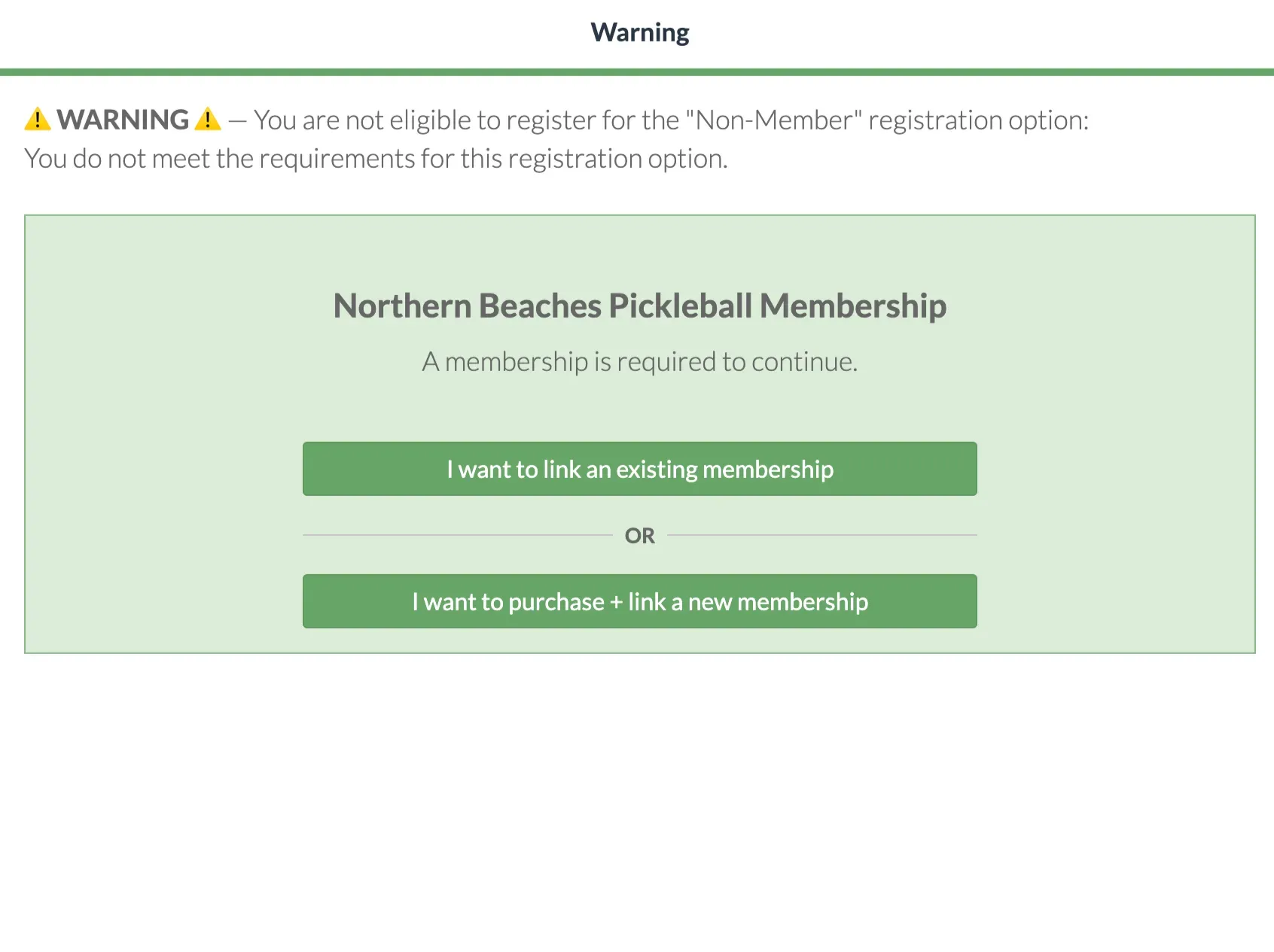
After 28 days, guests must have an active PA Membership Expiry date in the future to continue registering. Otherwise, they’ll be prompted to purchase and link a membership before registering again.
Registration Structure
This setup uses two registration options:
- Member Registration - Available to players with an active Club Membership.
- Non-Member Registration - Available to guests within their first 28 days, or players with an active PA Membership.
After the 28-day guest window, players must meet the requirements for the registration option they select: an active Club Membership for Member Registration, or an active PA Membership for Non-Member Registration.
Step 1: Create Member Rules
Member Rules for Member Registration
This rule identifies players who meet your club’s membership requirements and grants them access to the Member Registration option.
Depending on your club’s membership structure, you may choose to verify either:
- Active Club Membership
- Active Pickleball Australia Membership
The example below demonstrates Active Club Membership verification. Configure the rule based on the membership requirements your club uses for member pricing and member registrations.
Creating the Member Rule for Active Club Membership
- Locate Group Profile > Dashboard > Settings.
- Click Member Rules.
- Select Create Member Rule.
- Create a title such as Current Club Member.
- Select Error Type: Invalid PA Membership Status.
- The error message will be displayed when a player attempts to register for a Member registration type. They’ll be prompted to purchase and link their membership via revSPORT if they do not have a membership or the membership needs to be renewed.

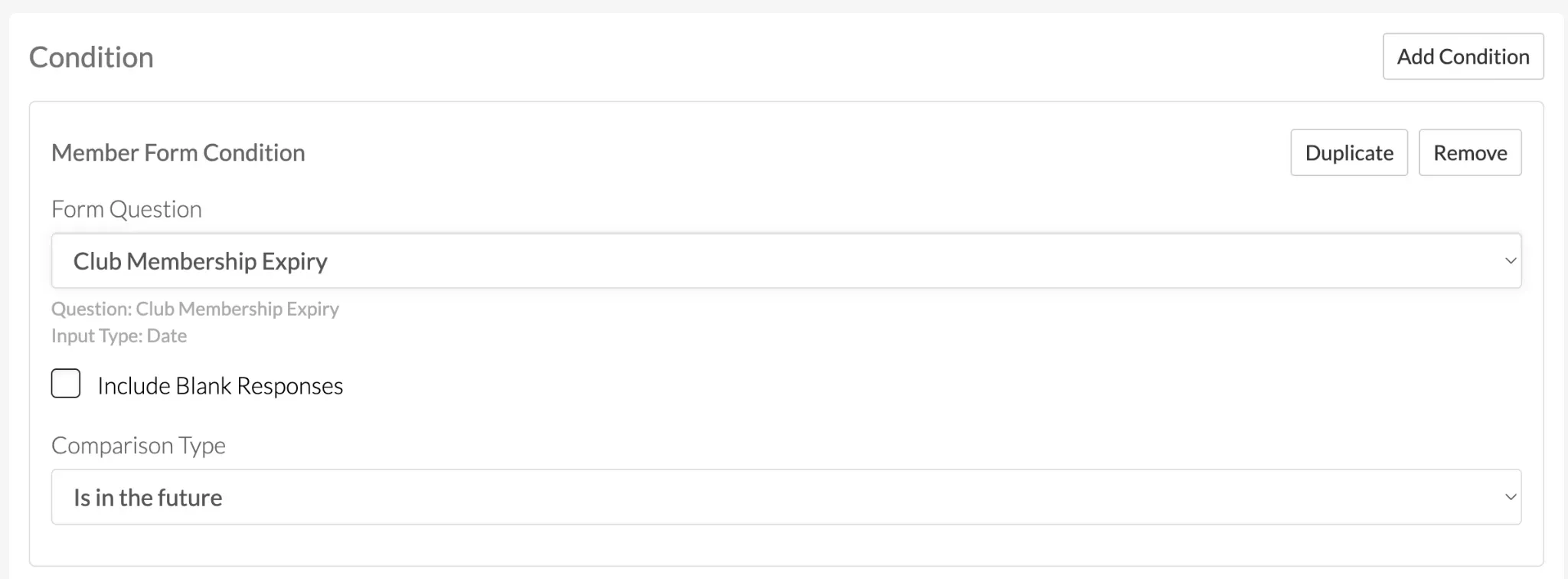
- Select Add Condition > Add Member Form Condition.
- Select Club Membership Expiry.
- Set Comparison Type to Is in future.
Click Create Rule. The rule will be saved and can be added to registration options later.
Creating Member Rules for Non-Member Registration
This rule controls access to the Non-Member Registration option.
Players will be eligible if at least one of the following conditions is met:
- They are still within their first 28 days of registering for club activities on OpenSports.
- They have an active Pickleball Australia Membership with an expiry date in the future.
Once the 28-day guest window has passed, players must have an active Pickleball Australia Membership for insurance purposes to continue registering through the Non-Member Registration option.
To register as a member, they must meet your club’s Member Registration requirements, such as having an active Club Membership, PA Membership, or both.
To configure this rule:
- Locate Group Profile > Dashboard > Settings.
- Click Member Rules.
- Select Create Member Rule.
- Create a title such as 28-Day Guest Window / PA Member.
- Select Error Type: Invalid PA Membership Status.
- The error message will be displayed when a player attempts to register for a Non-Member registration type after the 28-day period. They’ll be prompted to purchase and link their membership via revSPORT.

- Select Add Condition.
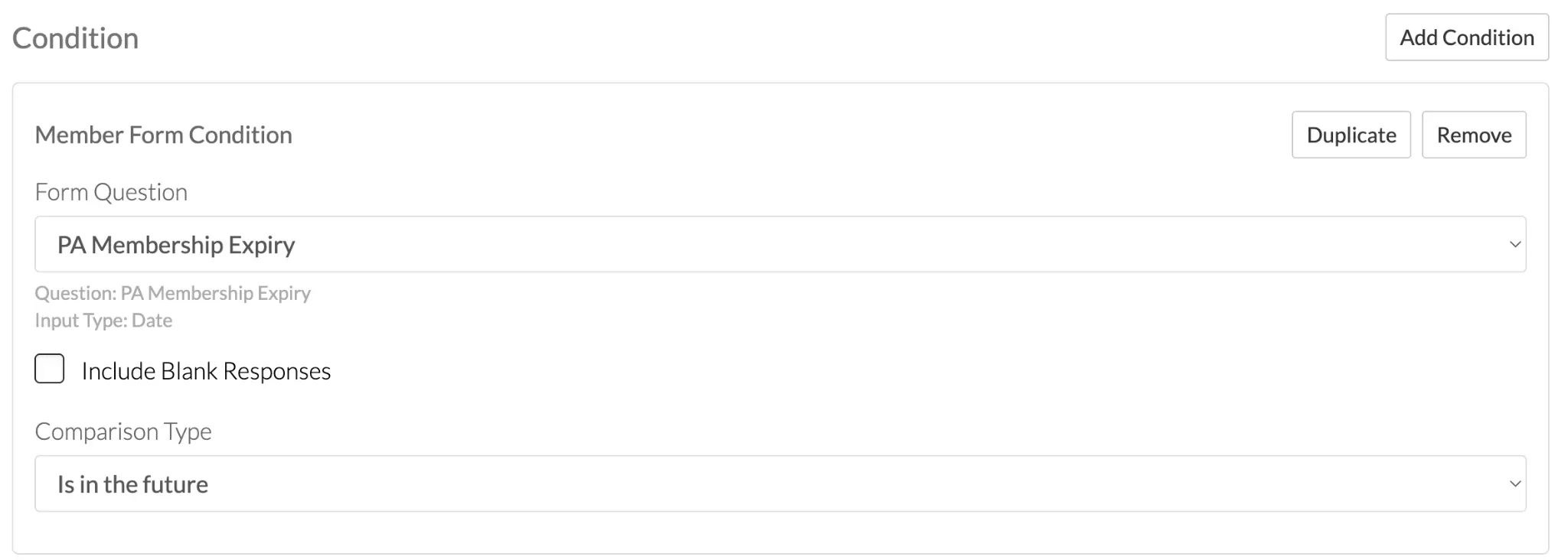
Condition One
Select Add Member Form Condition > PA Membership Expiry, and set the comparison to Is in the future.
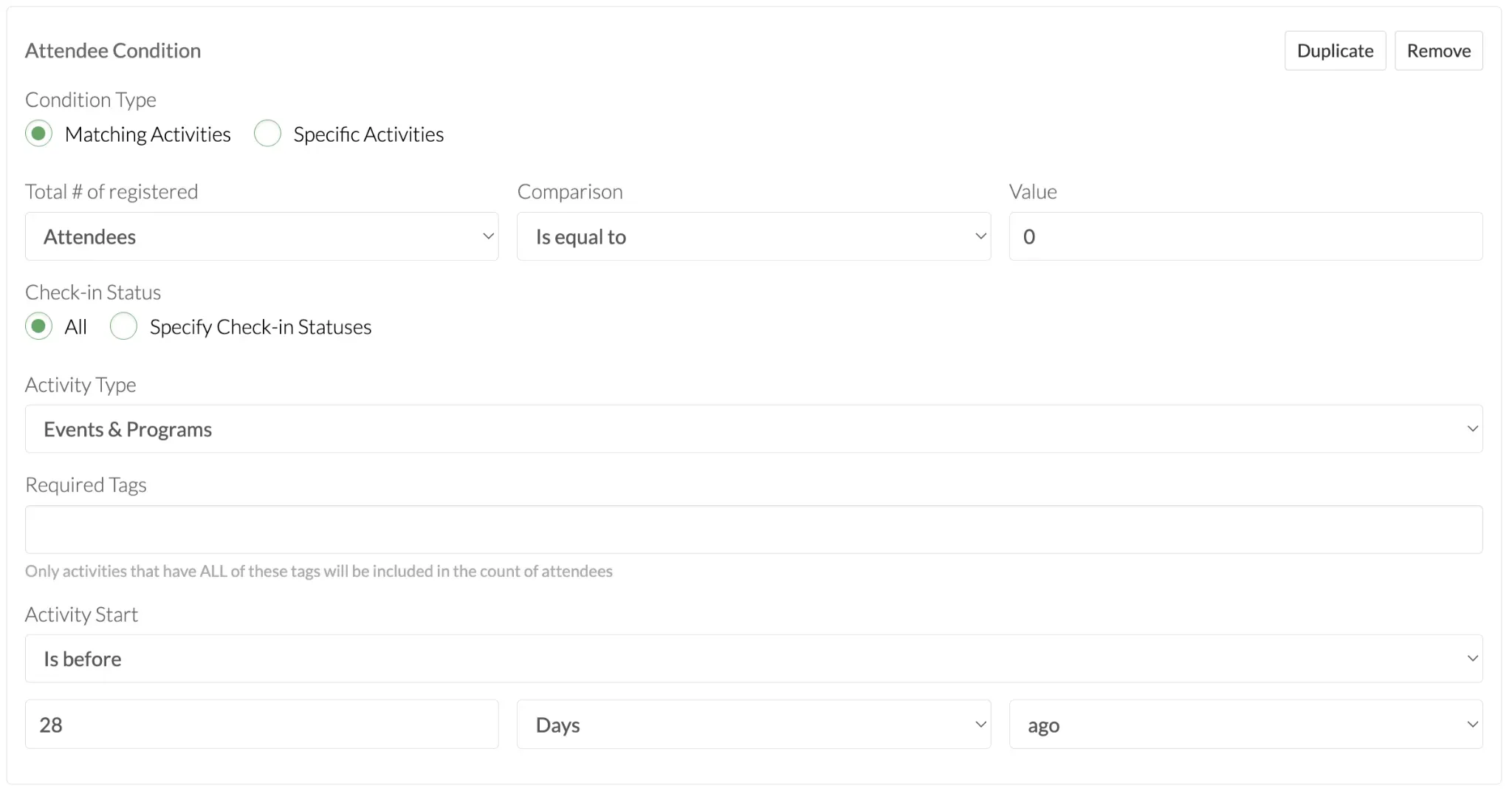
Condition Two
Select Add Attendee Condition and set the comparison to Is equal to, value to 0, and activity start comparison to Is before 28 days ago.
At the end of the rule setup, select At least one condition is met. This means the player only needs to meet one of the rule conditions to be eligible for Non-Member Registration.
For this setup, the player can register if they are either:
- within their first 28 days of registering for club activities, or
- have an active PA Membership Expiry date in the future.

Once this rule is created, it will be applied to the Non-Member Registration option during event creation. This ensures the system automatically checks whether the player is eligible before allowing them to register as a non-member.
Step 2: Apply the Rules to Events
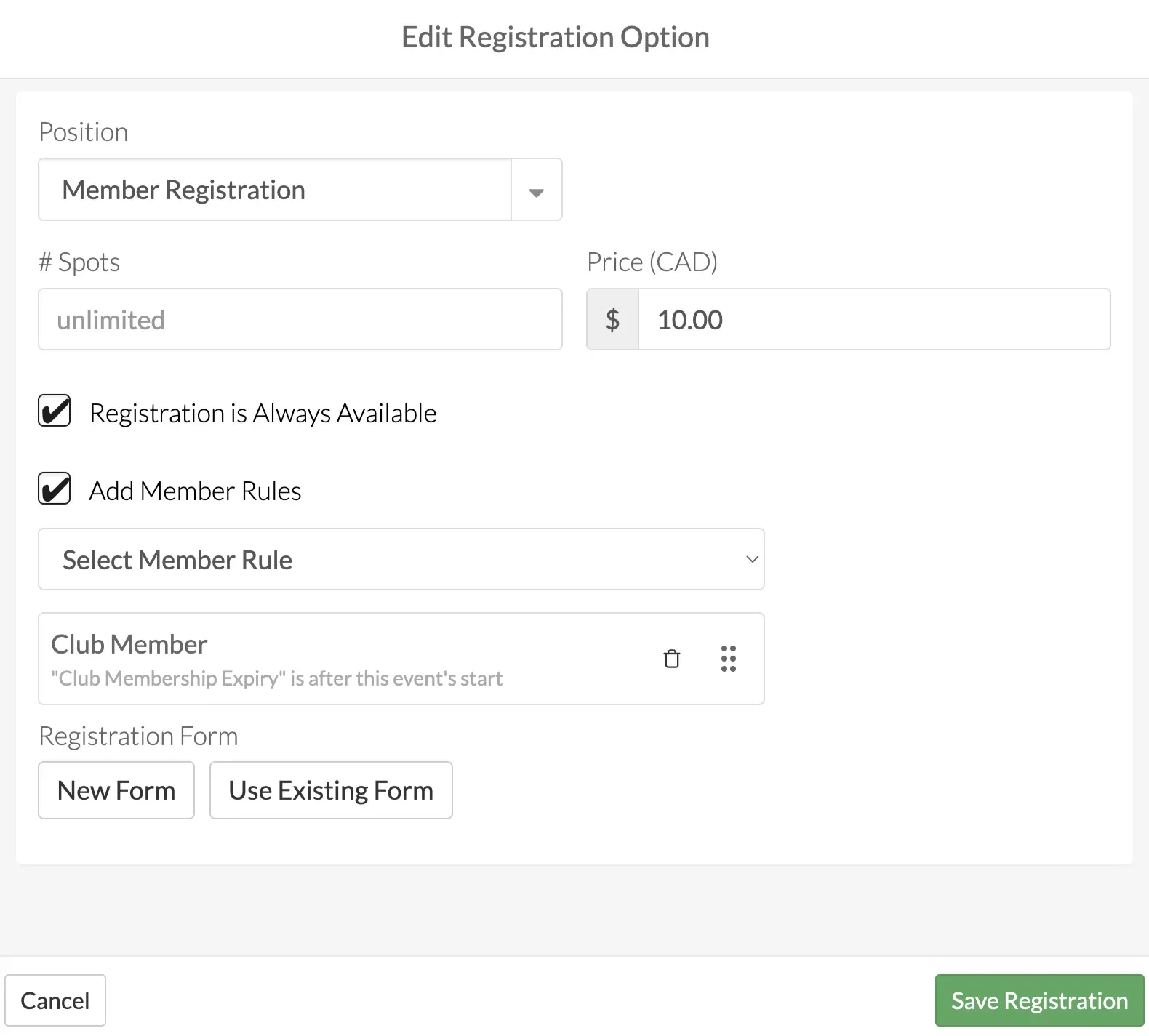
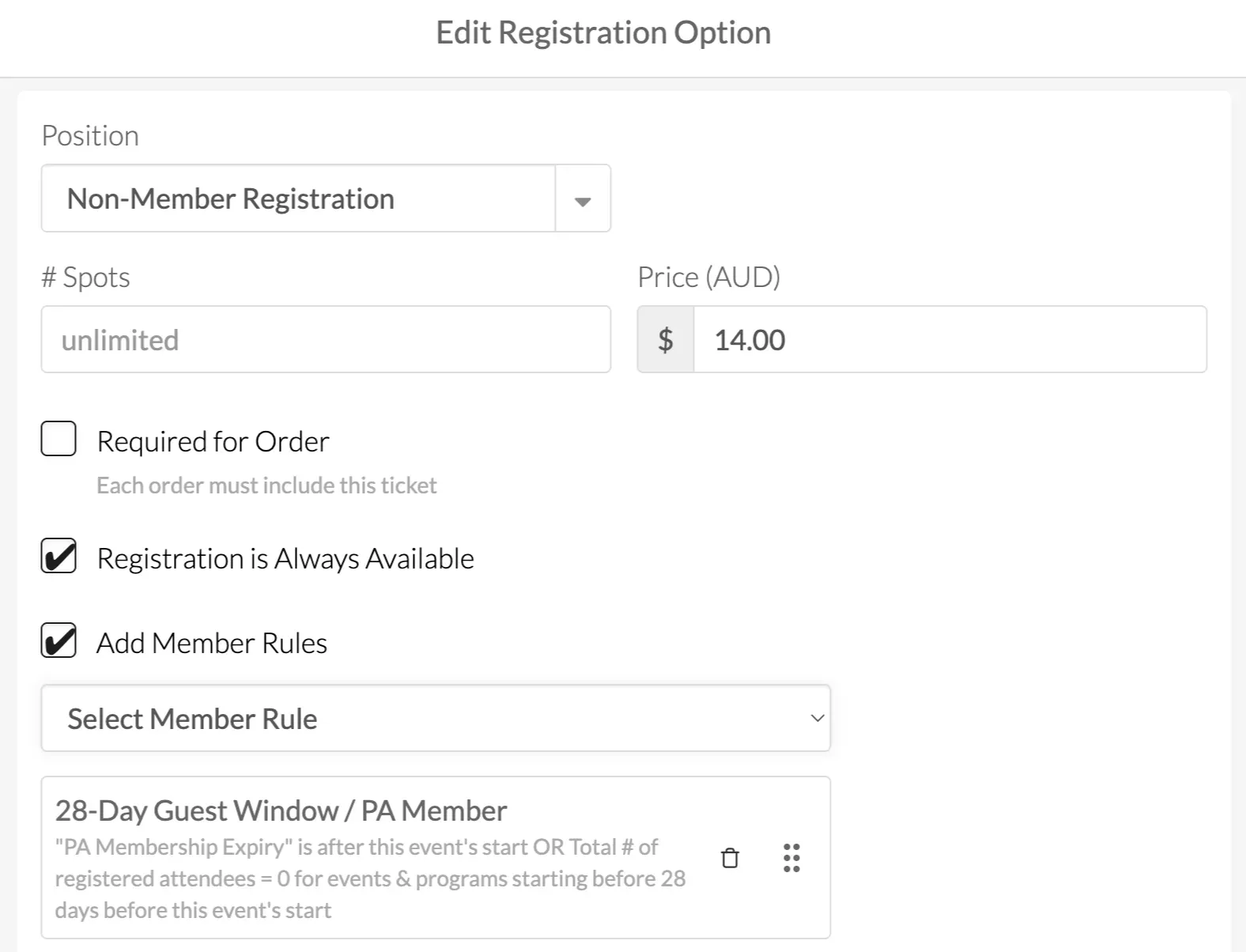
When creating an event, locate the Registration section and create two registration options:
- Member Registration
- Non-Member Registration
Setting Up Member Registration
- Check Add Member Rule.
- Select the Current Club Member rule that was previously created.
- Click Save.
Setting Up Non-Member Registration
- Check Add Member Rule.
- Select the 28-Day Guest Window / PA Member member rule.
- Click Save.
Managing Guest Players
Once the Non-Member Registration option has been configured with the 28-day guest window rule, no ongoing admin action is required.
When a guest registers, the system will automatically check whether they meet at least one of the required conditions. Guests can register if they are still within their first 28 days of registering for club activities, or if they have an active PA Membership Expiry date in the future.
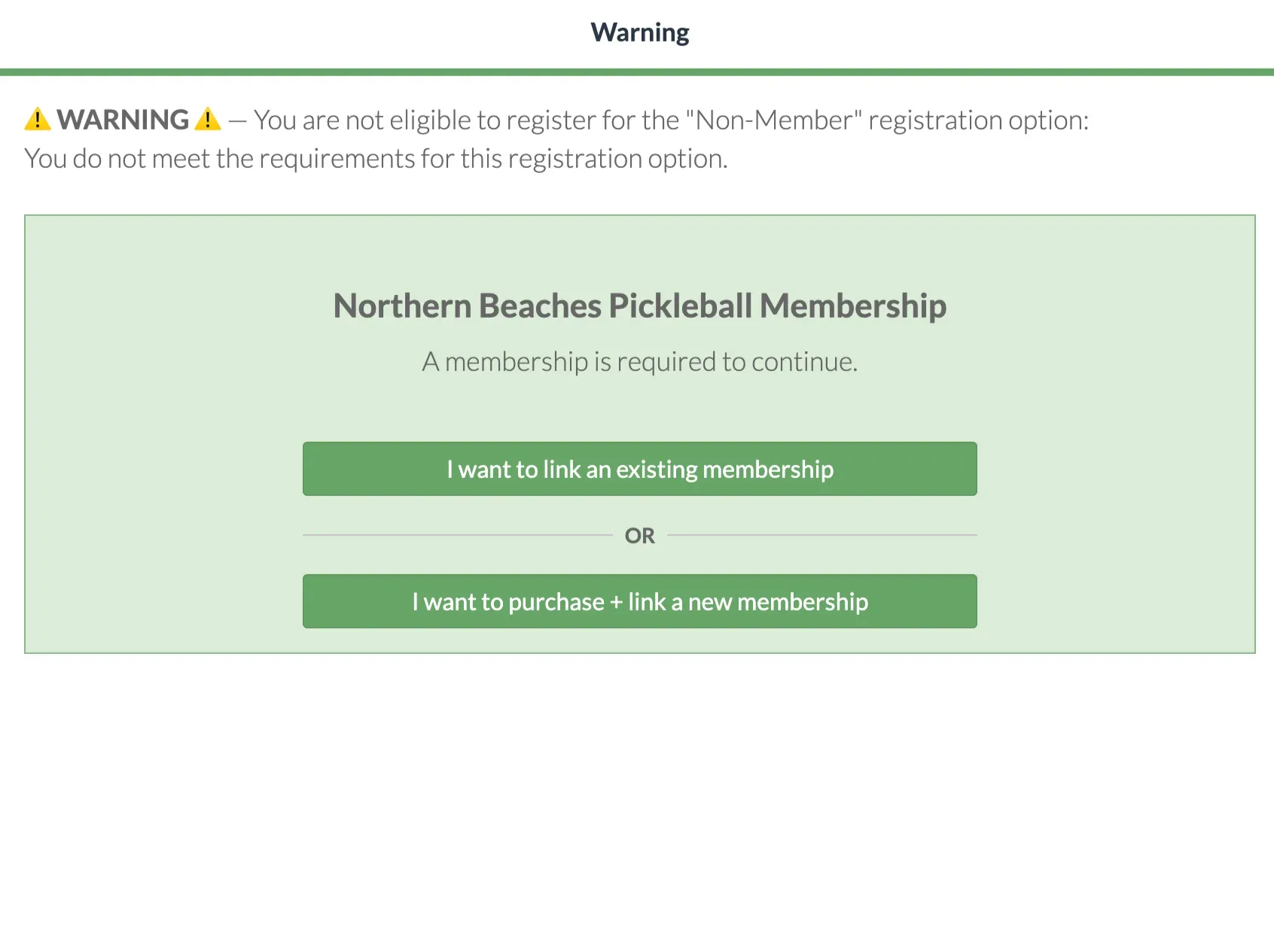
If the guest is outside their 28-day window and does not have an active PA Membership, they will no longer be eligible for the Non-Member Registration option. They’ll be prompted to purchase and link a membership before registering again.
Purchasing a Membership
Players who are no longer within their 28-day guest window and do not have an active PA Membership will be prompted to purchase and link a membership before registering again.
Once the membership has been purchased and linked to their OpenSports account:
- PA Membership Expiry information will automatically sync to OpenSports.
- The player will become eligible to continue registering.
- No manual updates are required by club administrators.
Membership updates typically sync within a few minutes of purchase.
Recommended Setup
Many Pickleball Australia clubs use the following registration structure:
Member Registration
- Discounted member pricing.
- Restricted to players with an active Club Membership.
- Protected using the Current Club Member rule.
Non-Member Registration
- Higher non-member pricing.
- Available to guests within their first 28 days, or players with an active PA Membership who do not have a Club Membership.
- Used for guests, international visitors, and players within their 28-day guest window.
This approach helps:
- Encourage membership purchases.
- Provide member-only pricing benefits.
- Allow new players to try the club before committing to a membership.
- Reduce manual membership verification by administrators.
Many clubs also include a note in their event description or registration confirmation email outlining the benefits of becoming a member.
FAQ
1. Can I require a Club Membership or a Pickleball Australia Membership?
Depending on your club’s requirements, you can set registration to require either a Club Membership or a Pickleball Australia Membership.
If your club requires a Club Membership, players will automatically also have a Pickleball Australia Membership, since purchasing a club membership includes Pickleball Australia membership.
2. Can I customize the registration names?
The registration option names can be customized to match your club’s terminology. Regardless of the names you choose, we recommend making it clear which option applies to each player type.
3. Can I charge different prices for Members and Non-Members?
Each registration option can have its own pricing. Many clubs offer discounted pricing for members and a higher casual rate for non-members to encourage membership purchases.
Related Articles
Questions? Send them our way: support@opensports.net